Lock and Unlock Folder(s) : How to Lock and Unlock one or more Folder(s) Using Notepad?

By rancidTaste
Sometimes you need to apply restriction of some folders which are really personal for you. There are many softwares to protect your folders from unauthorized access. Those software really cost much. But there is an alternate solution which also is capable to provide restriction of your private folders. You can do this by using notepad. This page contains information to lock a folder using notepad and to unlock a folder using another notepad.
Steps to Lock and Unlock a Folder Using Notepad
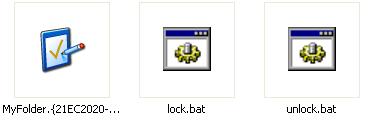
Suppose, you have a personal folder named as MyFolder which has all the private information about you. So, you want to lock that folder. Moreover, you may also able to unlock that folder when you also necessary.
To lock the folder using a notepad follow the following steps:
1. Open notepad and copy the following code segment:
ren MyFolder MyFolder.{21EC2020-3AEA-1069-A2DD-08002B30309D}
2. Save the file as Lock.bat name. The extension of that file must be .bat extension.
3. Double click Lock.bat and the folder MyFolder will be locked.
To unlock the folder using a notepad follow the following steps:
1. Open notepad and copy the following code segment:
ren MyFolder.{21EC2020-3AEA-1069-A2DD-08002B30309D} MyFolder
2. Save the file as UnLockKey.bat name. The extension of that file must be .bat extension.
3. Double click UnLockKey.bat and the folder MyFolder will be unlocked.
Sometimes, you may mistake. That's why I send all files in a zip format to download. Here you will find all the lock and unlock a file and a folder to which you unlock. Open the .bat files in notepad and check whether your codes are OK or not. I think it really helps you.
Download the files for your experiment
You may use these codes any where. The only thing you have to remember, is to change the name of your folders to which you want to lock or unlock. The easiest way is to copy the two bat files and paste there where you want to lock or unlock any particular folder. Now open the two bat files with notepad, and change the folder name as the folder you want to lock or unlock. That's the easiest way to do.
By following the above steps, you can easily lock or unlock the necessary folders easily. Moreover, this technique can also be applied your pen drive locking process also.
© Written by rancidTaste

Recent Pages of itis123
- How to install Twitter widget into your blog?
Twitter, is becoming very popular day-by-day and a free social messaging utility for staying connected in real-time with your friends.
- How to add "Top of the page" icon to your blog?
"Top of the page" icon link is an important thing if your blog post is long.
- How to find out and change the size of your blog's header image?
Blogger header image gives the uniqueness of your blog among the millions of blogs.
- Troubleshooting
If you are a compute user, then you may face several types of problems at different times.
- ESET NOD32
Virus, Malware, Trojan, Worm, Spyware, Adware, Botnet etc.
- NOD32 keys
ESET NOD32 is one of the best effective and most proactive antivirus software and malware protection.
- How to Get Free ESET NOD32 Antivirus Key And Password
Different antivirus software are used to protect our PC form virus.
- Changing Your Blog's Header Image
You can easily add your favorite image or photo as a blog's header image.
rancidTaste's Recent Pages
- Drawing a line: How to draw a line using HTML 5?
HTML5 canvas API provides basics tools and great supports to draw and style different types of sub paths including lines, arcs, Quadratic curves, and Bezier curves, as well as a means for creating paths by connecting sub paths. - 5 days ago
- SEO Pages
SEO, Search Engine Optimization and Keywords - these common three terms are the brainstorming terms for any content publisher, seo company, seo service provider, seo researcher, seo firm, seo consultant, seo professional or other seo lover. - 3 months ago
- WordPress.org vs. WordPress.com: An explained comparison between WordPress.org an WordPress.com
WordPress is a common name but do you know that there are two things: WordPress. - 3 months ago
- Creating database from cpanel: How to create a database from cpanel hosting?
A step by step full tutorial to create a database from cpanel hosting account for any dynamic website. - 3 months ago
- Natural Join in Database: Retrieving records from more than one table with Natural Joins
Natural Join is one of the sql joining. - 3 months ago
- Explanation of SQL Join: Obtaining data from multiple tables using Join
Explanation of SQL Join: Obtaining data from multiple tables using Join. - 3 months ago
- How to solve "CreateFile error 32 when trying set file time" Error During Oracle Installation
Solution of the Oracle installation problem on Windows 7 / Windows XP during Oracle installation start-up. - 3 months ago
- A Brief Explanation of SQL Statements and Classification
Any type of database is based on several statements. - 3 months ago
Comments
darkside, I think the code is ok. Would you please download the zip files and see the code. I just add the download link. You can download that and follow the instructions. I think it will be working. If you face problem, tell me. I will try to solve. I again give you the code download link: http://www.box.net/shared/svzybozgq0 [please follow the instruction which I mentioned after the steps]
Downloaded it, unzipped it (I have winRAR) and then double clicked the lock.bat, and then tried opening the folder. And it opened.
I'm using a Dell notebook with Windows Vista on it.
Darkside, I do all the steps in Windows XP and it's totally working under Windows XP. I don't use Vista. Most probably, the Operating system (Vista) does not support that.
[For me, I'm using Toshiba notebook and Windows XP Service Pack 3. The process is totally working.]
Okay, it mustn't work in Vista then. :( Oh well, I had been looking for something like this for... 8 years! :D
At least I know now that it can be done, even if not on the latest Windows product.
it's fully workable in windows XP... i use it in this way. i think there must be some solution for vista. i will try for that. but the main problem is that i need to install vista. [i don't like vista (i don't know the reason). i only like XP and ubuntu].
Anyway, i will try myself to find such a solution for windows vista.
I did a search for lock unlock notepad folder and the second result could be the Vista solution. And yours came in at number 1 result by the way :D
Thanks for sharing with us ..and the comments are helpful..thanks and keep posting..good luck :D
I love u mannnnnnnnnnn
u saved my life................thanku very very very very very very very much............
ei wazup
this process of folder hide is not valid for windows7,,,pls check and send me some valid idea of folder hiding using notepad which are applicable for windows 7 also
darkside 2 years ago
I tried it. Followed the instructions by the letter. By double clicking the Lock.bat file it renamed the folder. But I could still open the folder. Did I miss something?