How to create a batch file

By rancidTaste
A batch file is a text file containing a series of commands. If the batch file is run, it reads all the inputs sequentially one by one and provide the outputs. This page will provide you the details idea about batch file and the process of creating batch file.
Extension of batch file name:
Generally each operating system has different extension for batch file. Some of them are mentions below:
- For DOS, the extension is .bat
- For Windows, the extension is .bat
- For Windows NT, the extension is .cmd
- For 4DOS, the extension is .btm
- For Windows 9x, the extension is .bat
Steps fosr creating DOS file:
- After clicking on Start menu, select Run and type notepad. Now you will see a window will be opened. Notepad is used to write the code. You may use any other type of editor also such as wordpad, editplus etc.
- From that window, click on File and you will see a drop down menu will be appeared. Select Save As... form the drop down menu.
- Later, you will write the file name and a .bat extension of that file. For example, if your file name is myFile than the file name will be myFile.bat.
- Type @echo off at the beginning of the file. This line prevents the spaces in the batch file to read during execution time.
- Now write the desired command on each line one by one.
- Save the file and close the file.
- Go to the location where you save the file. Double click on the file (in this case myFile.bat). Now the program will run and from now you don't need to write the command again and again. You just double click on the .bat file and all's are done.
Example of creating batch file:
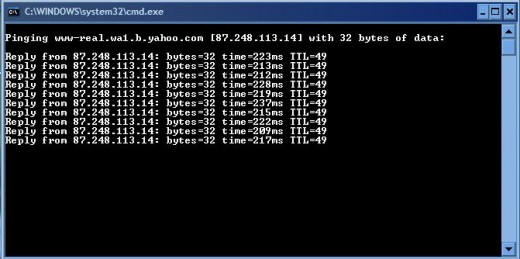
You want to check your internet connectivity by pinging one ip or address such as yahoo.com. So, your batch file will look like the followings:
@echo off
ping www.yahoo.com -t
The out put of the program will be like the following:
By following the above steps, you can easily create a batch file and run it easily without writing the commands each time.
If you enjoyed this post, please consider to leave a comment at the end of the page or subscribe to the feed and get future articles delivered to your feed reader.
itis123's Recent Pages
- How to install Twitter widget into your blog?
Twitter, is becoming very popular day-by-day and a free social messaging utility for staying connected in real-time with your friends.
- How to add "Top of the page" icon to your blog?
"Top of the page" icon link is an important thing if your blog post is long.
- How to find out and change the size of your blog's header image?
Blogger header image gives the uniqueness of your blog among the millions of blogs.
- Troubleshooting
If you are a compute user, then you may face several types of problems at different times.
- ESET NOD32
Virus, Malware, Trojan, Worm, Spyware, Adware, Botnet etc.
- NOD32 keys
ESET NOD32 is one of the best effective and most proactive antivirus software and malware protection.
- How to Get Free ESET NOD32 Antivirus Key And Password
Different antivirus software are used to protect our PC form virus.
- Changing Your Blog's Header Image
You can easily add your favorite image or photo as a blog's header image.
rancidTaste's Recent Pages
- Drawing a line: How to draw a line using HTML 5?
HTML5 canvas API provides basics tools and great supports to draw and style different types of sub paths including lines, arcs, Quadratic curves, and Bezier curves, as well as a means for creating paths by connecting sub paths. - 5 days ago
- SEO Pages
SEO, Search Engine Optimization and Keywords - these common three terms are the brainstorming terms for any content publisher, seo company, seo service provider, seo researcher, seo firm, seo consultant, seo professional or other seo lover. - 3 months ago
- WordPress.org vs. WordPress.com: An explained comparison between WordPress.org an WordPress.com
WordPress is a common name but do you know that there are two things: WordPress. - 3 months ago
- Creating database from cpanel: How to create a database from cpanel hosting?
A step by step full tutorial to create a database from cpanel hosting account for any dynamic website. - 3 months ago
- Natural Join in Database: Retrieving records from more than one table with Natural Joins
Natural Join is one of the sql joining. - 3 months ago
- Explanation of SQL Join: Obtaining data from multiple tables using Join
Explanation of SQL Join: Obtaining data from multiple tables using Join. - 3 months ago
- How to solve "CreateFile error 32 when trying set file time" Error During Oracle Installation
Solution of the Oracle installation problem on Windows 7 / Windows XP during Oracle installation start-up. - 3 months ago
- A Brief Explanation of SQL Statements and Classification
Any type of database is based on several statements. - 3 months ago
Comments
>>After clicking on Start menu, select Run and type notepad.
I use Dr.Batcher (http://www.drbatcher.com) to create batch files, it's much handier than notepad.
can't i get a command for creating multiple dos windows by clicking on single batch file to check diff ip's.
if anybody knows the answer plz mail me at srikanth296@gmail.com
thank u
wooow really great effort thx alot for that post it helps me alot :) hope to see more efficient posts like that
Really this is the good Process for creating & running the batch file in any kind of Envirnoment.
wow very great its really help me thnx alot
Thank you for sharing this hub. It helped me out. I voted you up. Have a great day my friend.
The expalin of way is very easy to understand. Thank you
godofwar1527 21 months ago
plz visit my youtube channel im comming up with a command prompt video and it will have all kinda cool stuff
and nice tutorial ty
and if anyone doesnt like this they can go shutdown -s -t 1 -c " your so not smart" yourself in run or cmd